Workday Ready
A New Experience for UCF College of Medicine Affiliate & Volunteer Faculty
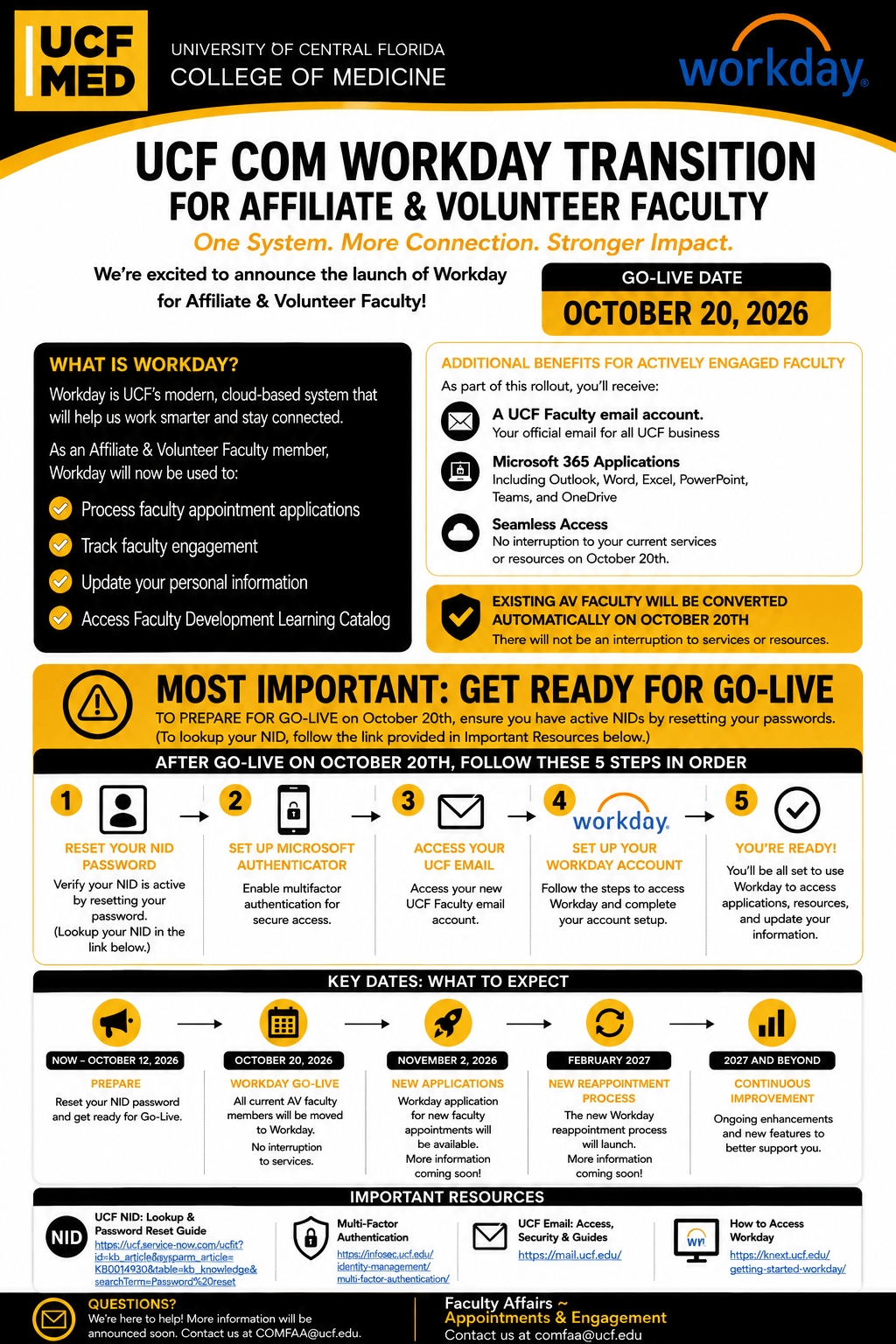
Go-Live: October 20th, 2026
Phase 2 – Workday is Live!
Existing A/V faculty must complete the After Go-Live steps below!
Welcome!
The UCF College of Medicine is transitioning existing Affiliate and Volunteer (AV) faculty to Workday, creating a more streamlined experience for managing faculty appointments, engagement, information, and learning resources.
Existing Affiliate and Volunteer faculty will be converted automatically on October 20th, 2026. There is no expected interruption to your current UCF services or resources.
As implementation continues, this page will be updated with important announcements, training opportunities, timelines, and answers to frequently asked questions. We encourage you to check back regularly for the latest information and updates.
- What You Need to Know
- Includes both Prior to Go-Live and After Go-Live information, as well as FAQs.
- Workday Transition Timeline
- College-wide implementation timeline over the next few months.
- Additional Resources
- Includes helpful and informative links.
- Benefits of Transition
- Includes the new additional benefits for actively engaged faculty.
☆ Start Here! ☆
What You Need to Know
1. Prior to Go-Live
Your most important steps before Go-Live:
- Know your NID (UCF Network ID). If unsure, click here.
- Reset your NID password and confirm you can successfully sign in.
- Keep your current contact information available for review after Go-Live.
Completion of these steps is pivotal for the transition. If you are unsure, you can use the helpful links below in the Additional Resources section.
No further setup is required prior to October 20th, 2026.
2. After Go-Live
For existing and actively appointed Affiliate & Volunteer faculty ONLY. If you do not have a current appointment, this section does not apply to you.
The points below will act as your Workday Ready checklist. Please complete these steps in order:
- Confirm your NID password and make sure your NID is active and your password works. Make sure you use your NID as your username. Example: jd120434@ucf.edu.
- Set Up Microsoft Authenticator, a multi-factor authentication system for secure access to UCF systems.
- Access your UCF email by signing in to Outlook.
- Access Workday by navigating to my.ucf.edu and selecting “Workday” under the ‘Essentials‘ section. You will use your NID/Password to login.
- Complete the required Information Security Awareness Compliance Training, a brief 20-minute training task available on your Workday Home page, within 30 days of conversion.
Frequently Asked Questions
- Participate in the faculty appointment application process.
- Maintain and update personal information.
- Support the College’s tracking of faculty engagement.
- Access the Faculty Development Learning Catalog.
- Participate in future faculty reappointment processes.
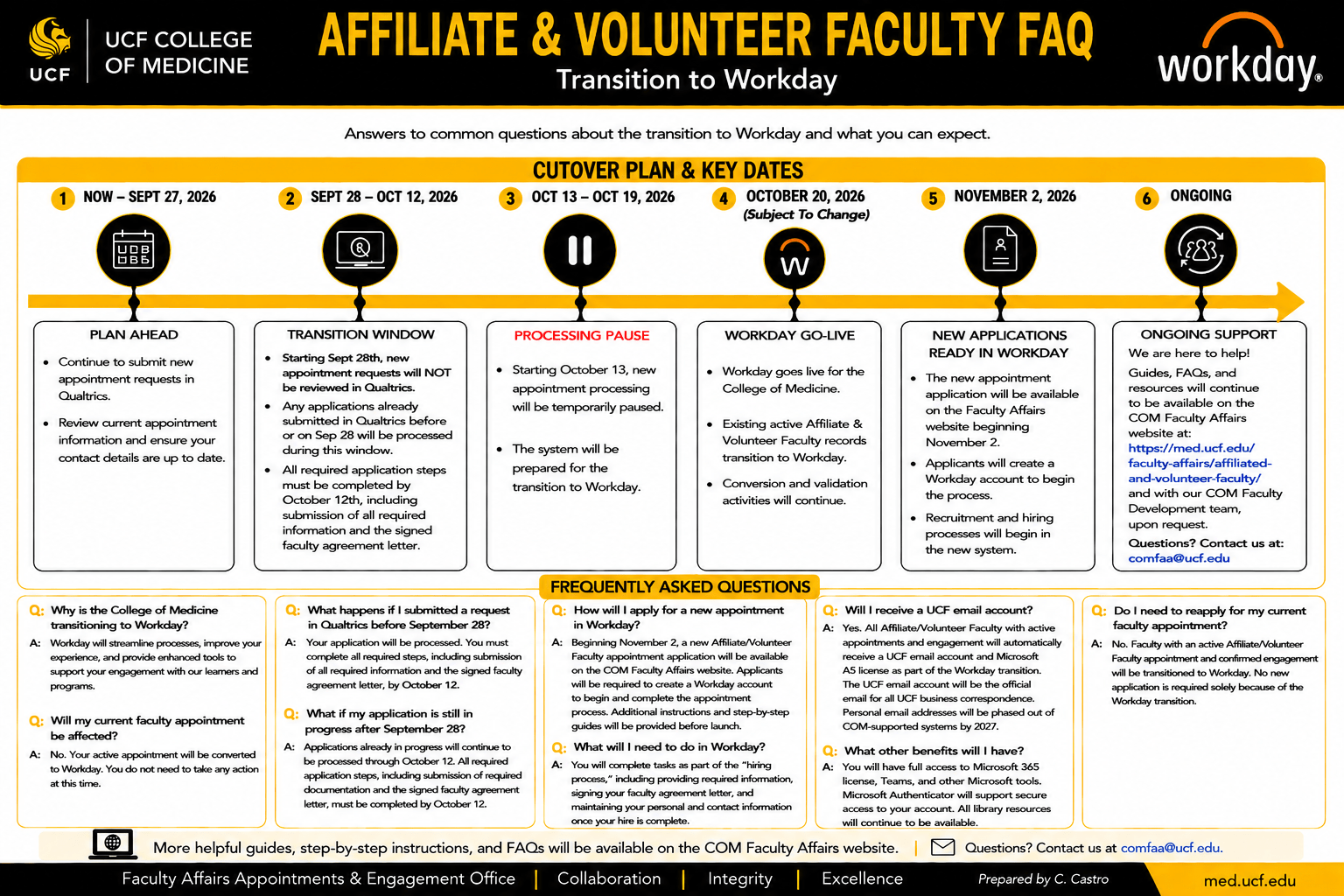
Workday Transition Timeline
Below is our official college-wide Workday transition timeline that provides a high-level overview of the implementation and the major phases of the project in the coming months.

Benefits of Transition
As part of the Workday rollout, actively engaged A/V faculty will receive additional UCF resources, including:
- UCF Faculty email account for official UCF business that provides a consistent UCF identity for official university communications. For policy on email usage, please refer to University Email Policy 4-016.2.
- Microsoft 365 applications, such as Outlook, Word, Excel, PowerPoint, Teams, and OneDrive.
- Continued access to UCF-supported tools and resources, including libraries.
- UCF ID card with personal headshot, which will be available online.
- COM Faculty Development Learning catalog and additional professional development.
Additional Resources
Need Help?
For Workday transition questions, please contact Faculty Affairs – Appointments & Engagement: comfaa@ucf.edu.
For technical support, please contact the COM Health IT Service Desk: HealthIT@ucf.edu.
As we move through the Workday implementation, additional resources will be made available to help you prepare for this transition, including:
- Workday training materials
- Frequently used forms
- Training module access
- Links to additional Workday information
Please check back as new resources are added.